In Silver and Blood: Requiem, the gacha system is central to recruiting powerful Vassals who join your fight across the cursed world of Minexus. Much like other RPG gacha experiences, your success hinges on summoning top-tier characters and creating teams with strong synergy. However, Silver and Blood’s gacha mechanics run deeper than a simple pull-and-pray loop. With multiple banners, distinct currencies, pity systems, and summon types to master, players must learn how to efficiently manage their resources. This guide will help you navigate all of these elements. Let’s get started!
How the Gacha System Works in Silver and Blood: Requiem
In Silver and Blood: Requiem, the gacha system becomes available after you finish the introductory tutorial. This process can take a while due to numerous cut-scenes and limited quality-of-life features, such as the 2x battle speed option that unlocks later in the game. Officially referred to as "Embrace," the system includes multiple summoning banners, each with its own mechanics. Some banners feature unique pity rules and may even require different summoning currencies.
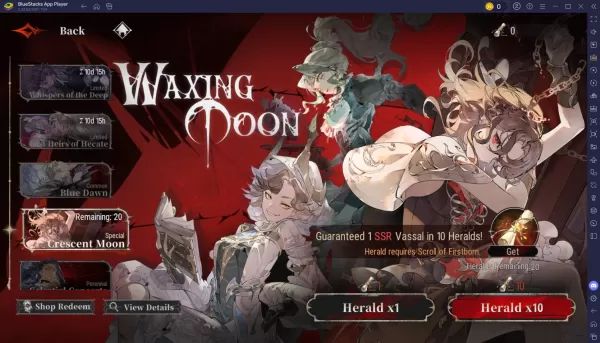
Gacha Currencies in Silver and Blood: Requiem Explained
Here are the different summoning currencies used in Silver and Blood: Requiem:
Moon Tears – The game's premium currency. You can obtain Moon Tears by completing events, quests, and the Infinite Abyss. Use them to summon Vassals on event banners and Blue Dawn banners. Soothing Embraces – A currency specifically for the Blue Dawn banner. Acquire them by progressing through the main story, completing events and achievements, redeeming codes, and finishing quests. Vestige of Love – A currency used exclusively for event summoning banners. You can earn it by participating in events, clearing story chapters, completing achievements, and finishing missions. Dusk-veiled Ribbons – This currency is only used on the Celestial Concerto banner. Obtain Dusk-veiled Ribbons by exchanging Friendship Points.
You can also enjoy Silver and Blood: Requiem on a larger PC or laptop screen using BlueStacks, with full support for keyboard and mouse controls.
![My Cute Succubus - Girls in Hell [18+]](https://images.ydeng.com/uploads/98/17315786356735cb0b46adf.png)